
ForeSight Golf Simulator vs Basic Launch Monitor: What Is the Difference?
A basic launch monitor gives rough swing numbers. A ForeSight golf simulator gives full shot data and real course play. Golfers around Dawsonville often own a small launch monitor at home, or they’ve seen one in a friend’s garage setup.
Then they hear about ForeSight golf simulator technology and wonder if it’s just a fancier version of the same thing. It isn’t. ForeSight golf simulator vs launch monitor comes down to how much each device actually tells you about your swing, and whether it lets you play a real course. This guide breaks down that gap in plain terms, so you know exactly what you’re getting before you book a golf simulator session at Transcend Sports Performance or buy a device.
What Is a Basic Launch Monitor?
A basic launch monitor tracks a handful of swing numbers off one sensor. Most basic units sit near your feet on the tee or clip onto a phone. They use radar or a simple camera to read your swing. They track ball speed, sometimes launch angle, and give a rough carry distance guess. That’s usually where the data stops.
- Small, portable, often used at home or on a driving range
- Tracks basic numbers like ball speed and estimated distance
- Doesn’t show full ball flight or let you play a real course
- Accuracy often drops indoors without enough room to swing
Golfers use these for a quick distance check, not for a full swing breakdown.
What Is a ForeSight Golf Simulator?
A ForeSight golf simulator uses camera-based tracking to capture your full swing and ball flight.
A ForeSight setup sits inside a simulator bay with real turf underfoot and a screen up front. It uses multiple high-speed cameras, not just one sensor, to read the club and ball at impact.
- Tracks ball speed, spin rate, launch angle, club path, and face angle on every swing
- Shows real ball flight, not just a distance guess
- Lets you play real courses on-screen from indoor facilities
- Gives data on every shot within milliseconds of impact
This is the same category of golf technology PGA Tour players use to study their swing.
ForeSight Golf Simulator vs Launch Monitor: Side-by-Side Comparison
The two devices track different amounts of data, and that gap matters more the more serious you get about golf.
| Factor | Basic Launch Monitor | ForeSight Golf Simulator |
|---|---|---|
| Tracking Method | Single radar or camera sensor | Multiple high-speed cameras |
| Data Tracked | Ball speed, rough distance | Ball speed, spin rate, launch angle, club path, face angle |
| Course Play | No | Yes, full simulated rounds |
| Accuracy Indoors | Often limited | Built for indoor golf use |
| Best For | Casual home practice | Serious golfer tracking and course prep |
| Access | Personal device, one-time cost | Booked by simulator time at a facility |
Tracking Method
Golf Lesson [Basic Launch Monitor]: Single radar or camera sensor. It sits in one spot and reads your swing from a single angle, which limits how much detail it can pick up.
Golf Simulator Session [ForeSight]: Multiple high-speed cameras. They capture your swing from several angles at once, so the system catches details a single sensor misses.
Data Tracked
Basic Launch Monitor: Ball speed, rough distance. You get a general number to check how far you’re hitting, but not much beyond that.
ForeSight Golf Simulator: Ball speed, spin rate, launch angle, club path, face angle. Every swing gets broken down into the exact numbers that explain why the ball did what it did.
Course Play
Basic Launch Monitor: No. It only measures your swing, so you’re stuck hitting into a net or an open field with no course to play.
ForeSight Golf Simulator: Yes, full simulated rounds. You can play real course layouts on-screen, which turns practice into something closer to an actual round.
Accuracy Indoors
Basic Launch Monitor: Often limited. Tight indoor spaces cut down on the room these devices need to read your swing correctly.
ForeSight Golf Simulator: Built for indoor golf use. The camera system is designed to work inside a bay, so accuracy stays consistent no matter the space.
Best For
Basic Launch Monitor: Casual home practice. It fits golfers who just want a rough check on distance without much detail.
ForeSight Golf Simulator: Serious golfer tracking and course prep. It fits players working on a real swing fix or getting ready for a season.
Access
Basic Launch Monitor: Personal device, one-time cost. You buy it once and use it whenever you want, with no facility needed.
ForeSight Golf Simulator: Booked by simulator time at a facility. You reserve a bay and pay per session, which gives you access to pro-level tech without buying it yourself.
What Data Does Each One Actually Track?
A launch monitor gives you a few numbers. A ForeSight simulator gives you the full picture of every swing.
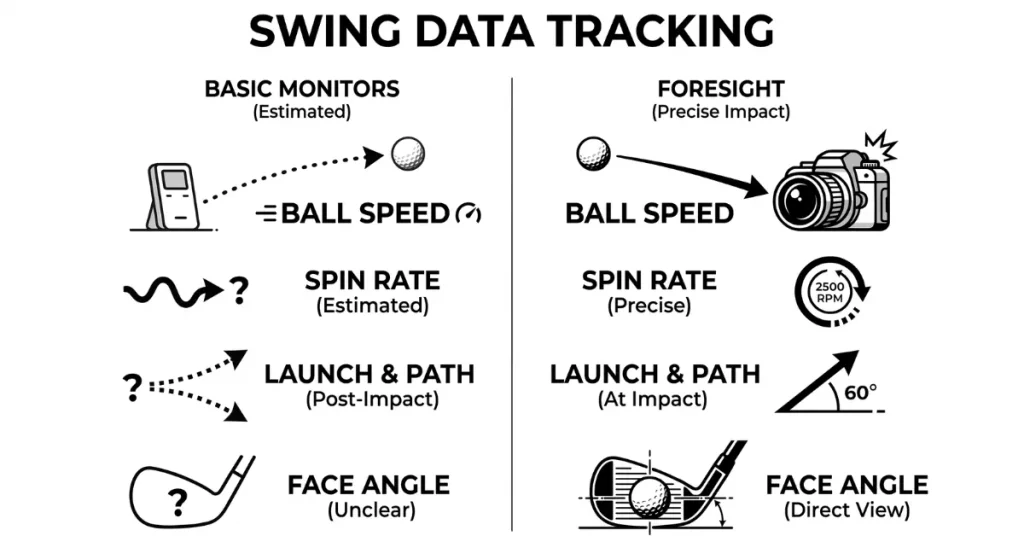
Ball Speed and Spin Rate
Most basic launch monitors show ball speed fine. Fewer show accurate spin rate, and spin is what makes your ball curve or stop on the green.
Launch Angle and Club Path
Launch angle and club path need more precise tracking than one sensor usually gives. ForeSight’s camera system captures both at impact, not an estimate made after the fact.
Face Angle at Impact
Face angle at impact is one of the biggest reasons a ball slices or hooks. Basic monitors rarely track this well. A full simulator environment reads it straight off high-speed camera footage.
Which One Should You Use?
A basic launch monitor works for casual practice. A ForeSight simulator fits golfers who want real, trackable improvement.
If you just want to know roughly how far your 7-iron flies, a home device works fine. If you’re chasing a lower handicap, prepping for a season, or fixing one specific miss, you need the deeper data a real simulator bay gives you. The right choice really comes down to your goal, not just your budget. Here’s a quick way to match your situation to the right tool.
| Your Situation | Best Choice | Why |
|---|---|---|
| Want a rough distance number for fun | Basic launch monitor | Quick, cheap, no setup needed |
| Practising casually at home | Basic launch monitor | Good enough for general swings |
| Working on a specific swing flaw | ForeSight golf simulator | Tracks spin rate, face angle, and club path |
| Prepping for a season or a tournament | ForeSight golf simulator | Full shot data shows real progress |
| Want to play real courses indoors | ForeSight golf simulator | Basic monitors don’t offer course play |
| Chasing a lower handicap | ForeSight golf simulator | Detailed feedback on every single shot |
FAQs
Is ForeSight More Accurate Than a Basic Launch Monitor?
Yes. ForeSight uses multiple cameras to track spin rate, launch angle, and face angle, data a single-sensor device usually misses.
Do I Need a Simulator If I Already Have a Launch Monitor?
If you want course play and full shot data, yes. A basic monitor only gives rough numbers, not the complete picture.
What Does ForeSight Track That Basic Devices Don’t?
ForeSight tracks spin rate, face angle, and club path with camera accuracy, along with full ball flight and real course simulation.
Can a Basic Launch Monitor Work Well Indoors?
Not always. Most basic units need open space to read your swing correctly, so accuracy often drops in a tight indoor room.
How Much Does a ForeSight Golf Simulator Session Cost at Transcend Sports Performance?
A 30-minute session costs $35, and a full hour costs $50 at Transcend Sports Performance in Dawsonville.
Is a ForeSight Simulator Worth It for a Casual Golfer?
If you only play a few times a year, a basic device is fine. If you want real progress, ForeSight gives you the data to track it.
Book a ForeSight Session in Dawsonville
Curious what your real swing data looks like? Transcend Sports Performance runs a full ForeSight golf simulator setup right here in Dawsonville. Book a 30-minute session for $35, or a full hour for $50, and see what real data reveals about your game. Reach out to our team today to schedule your bay time.